Android APP 登录 注册 SAE 部署 - [5] 客户端编写 - 注册
链接
内容
READ ME:
  如果你需要一个自己使用的APP登录和注册的Android demo。
  使用的是JAVA Web发布APP需要的信息
  JAVA Web获取APP的请求信息后查询外部数据库Mysql,并返回结果。
  APP通过Http client获取发布的信息
  进行登录或者注册操作
  请往下看,不然出门右转
客户端的编写
-
使用androidstudio 创建一个新的应用,这就是最简单的客户端。
- 后面增加新的功能
- 登录
- 注册
- 记住密码
- 自动登录
- 动画显示
- 好友添加
- 好友列表
- 日历显示
- Webview
- 天气显示
- 扫码功能
- 生成二维码功能
- 等
注册
- 先看布局文件,长这样
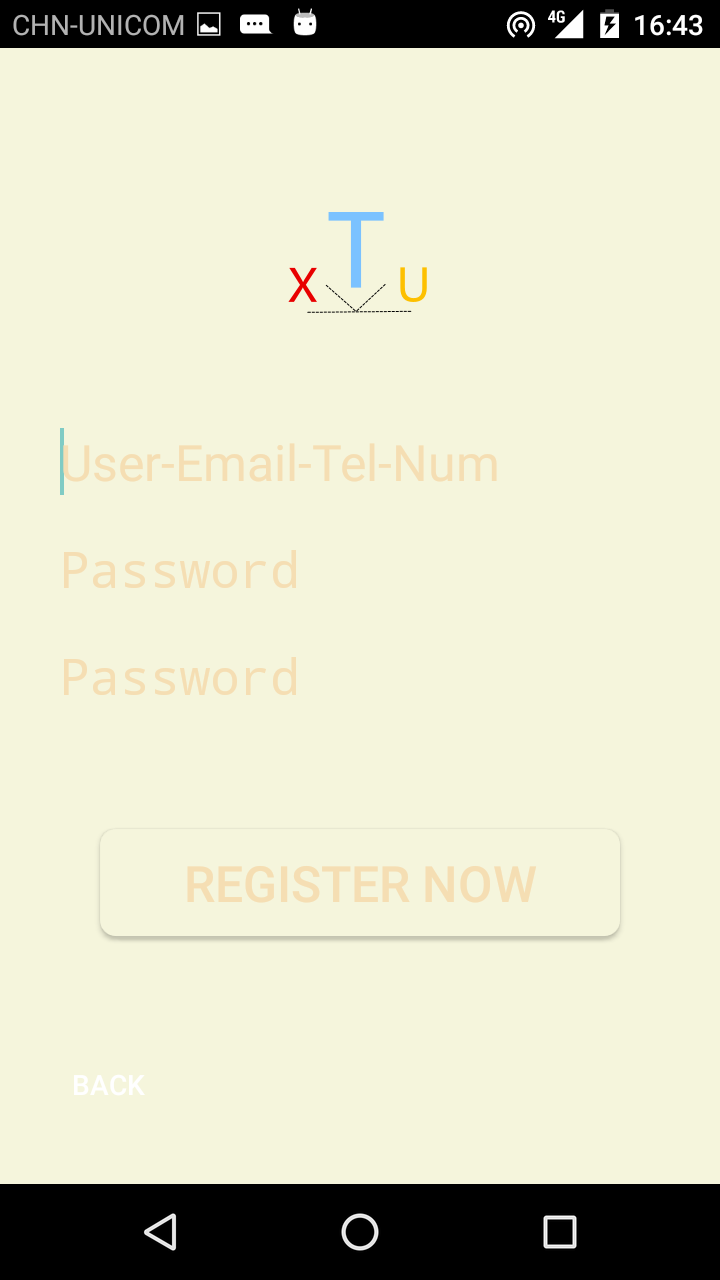
     <?xml version="1.0" encoding="utf-8"?>
    <LinearLayout xmlns:android="http://schemas.android.com/apk/res/android"
        android:layout_width="fill_parent"
        android:layout_height="fill_parent"
        android:orientation="vertical"
        android:background="@color/beige"
        xmlns:tools="http://schemas.android.com/tools" >
             <ScrollView
            android:id="@+id/login_form"
            android:layout_width="match_parent"
            android:layout_height="wrap_content" >
          <LinearLayout
                android:layout_width="match_parent"
                android:layout_height="wrap_content"
                android:orientation="vertical"
                android:layout_marginTop="50dp" >
            <ImageView
            android:layout_width="100dp"
            android:layout_height="100dp"
            android:layout_marginLeft="130dp"
            android:layout_marginRight="130dp"
            android:layout_marginTop="10dp"
            android:layout_marginBottom="20dp"
            android:background="@drawable/ic_launcher"
            android:gravity="center_horizontal"
            android:saveEnabled="true">

        </ImageView>

        <EditText
            android:layout_width="match_parent"
            android:layout_height="wrap_content"
            android:textSize="25sp"
            android:id="@+id/user_new"
            android:hint="User-Email-Tel-Num"
            android:textColorHint="@color/wheat"
            android:textColor="@color/maroon"
            android:layout_marginLeft="30dp"
            android:layout_marginRight="30dp"
            android:layout_marginTop="10dp"
            android:layout_marginBottom="10dp"
            android:maxLines="1"
            android:singleLine="true"
            android:background="@color/beige"
           />

        <EditText
            android:layout_width="match_parent"
            android:layout_height="wrap_content"
            android:textSize="25sp"
            android:id="@+id/pass_new"
            android:hint="Password"
            android:textColorHint="@color/wheat"
            android:textColor="@color/maroon"
            android:singleLine="true"
            android:inputType="textPassword"
            android:layout_marginLeft="30dp"
            android:layout_marginRight="30dp"
            android:layout_marginTop="10dp"
            android:maxLines="1"
            android:layout_marginBottom="10dp"
            android:background="@color/beige"
            />
        <EditText
            android:layout_width="match_parent"
            android:layout_height="wrap_content"
            android:textSize="25sp"
            android:id="@+id/pass_again"
            android:hint="Password"
            android:textColorHint="@color/wheat"
            android:textColor="@color/maroon"
            android:singleLine="true"
            android:inputType="textPassword"
            android:layout_marginLeft="30dp"
            android:layout_marginRight="30dp"
            android:layout_marginTop="10dp"
            android:maxLines="1"
            android:layout_marginBottom="10dp"
            android:background="@color/beige"
            />
        <Button
            android:id="@+id/button_register"
            android:layout_width="match_parent"
            android:layout_height="wrap_content"
            android:layout_marginLeft="50dp"
            android:layout_marginRight="50dp"
            android:layout_marginTop="50dp"
            android:layout_marginBottom="20dp"
            android:text="Register Now"
            android:onClick="RegisterNow"
            android:background="@drawable/shape"
            android:textSize="25sp"
            android:textColor="@color/wheat"
            ></Button>
        </LinearLayout>
        </ScrollView>
    <LinearLayout
         android:layout_width="wrap_content"
        android:layout_height="wrap_content"
        android:orientation="horizontal"
        android:gravity="center_horizontal"
        android:layout_marginBottom="10dp"
        android:layout_marginTop="30dp"
        >
           <Button
            android:id="@+id/button_back_new"
            android:layout_width="match_parent"
            android:layout_height="wrap_content"
            android:layout_marginLeft="10dp"
            android:layout_marginRight="10dp"
            android:onClick="Back"
             android:background="@null"
            android:layout_marginBottom="10dp"
            android:text="BACK"
            android:textColor="@color/white"
            ></Button>

    </LinearLayout>

    </LinearLayout>
注册代码
判断密码是否相同,判断用户是否存在
    package com.example.app_test;

    import android.app.Activity;
    import android.content.Intent;
    import android.os.Bundle;
    import android.text.Editable;
    import android.text.TextWatcher;
    import android.view.View;
    import android.view.Window;
    import android.widget.Button;
    import android.widget.EditText;
    import android.widget.Toast;

    public class RegisterNow extends Activity{
        private EditText user = null;
        private EditText pass = null;
        private EditText pass_again = null;
        private Button button_register = null;
        //private String username,password,passwordagain;
        private String username;
        private String user_city = "shanghai";
        private String user_get,pass_get,pass_again_get,result;


    protected void onCreate(Bundle savedInstanceState) {
    super.onCreate(savedInstanceState);
    requestWindowFeature(Window.FEATURE_NO_TITLE);
        setContentView(R.layout.register);
        user = (EditText )findViewById (R.id.user_new);
        pass = (EditText)findViewById(R.id.pass_new);
        pass_again = (EditText)findViewById(R.id.pass_again);
        button_register = (Button)findViewById(R.id.button_register);
        user.addTextChangedListener(Watchertext);

    }

    TextWatcher Watchertext = new TextWatcher() {
        private CharSequence temp;
        private int editStart;
        private int editEnd;
        @Override
        public void beforeTextChanged(CharSequence s, int start, int count, int after) {
            //user.setText(s);
        }

        @Override
        public void onTextChanged(CharSequence s, int start, int before, int count) {
            temp =s;
        }

        @Override
        public void afterTextChanged(Editable s) {
            editStart = user.getSelectionStart();
            editEnd = user.getSelectionEnd();
            if(!isLetterOrDigit(temp.toString())){

                Toast.makeText(RegisterNow.this,"username is Letter or Digit or _ !",Toast.LENGTH_SHORT).show();

            }
            if(temp.length() > 10)
            {
                Toast.makeText(RegisterNow.this,"too long for user name !",Toast.LENGTH_SHORT).show();
                s.delete(editStart-1,editEnd);
                int tempSeleciton = editStart;
                user.setSelection(tempSeleciton);
            }
        }
    };
    public static boolean isLetterOrDigit(String str) {
        boolean isLetterOrDigit = false;//定义一个boolean值,用来表示是否包含字母或数字
        for (int i = 0; i < str.length(); i++) {
            if (Character.isLetterOrDigit(str.charAt(i))) {   //用char包装类中的判断数字的方法判断每一个字符
                isLetterOrDigit = true;
            }
        }
        String regex = "^[a-zA-Z0-9]+$";
        boolean isRight = isLetterOrDigit && str.matches(regex);
        return isRight;
    }
    public void RegisterNow(View view){


        user_get = user.getText().toString();
        pass_get = pass.getText().toString();

        pass_again_get = pass_again.getText().toString();
        Bundle bundle = new Bundle();
        bundle.putString("user_get", user_get);
        bundle.putString("pass_get", pass_get);
        bundle.putString("pass_again_get", pass_again_get);
        Intent toregistersuccess = new Intent(RegisterNow.this,RegisterShow.class);
        toregistersuccess.putExtras(bundle);
        startActivity(toregistersuccess);
        RegisterNow.this.finish();


    }
    public void Back(View view){
        super.onBackPressed();
        this.finish();
    }


}