Android APP 登录 注册 SAE 部署 - [1] JavaWeb的编写与部署
链接
内容
READ ME:
  如果你需要一个自己使用的APP登录和注册的Android demo。
  使用的是JAVA Web发布APP需要的信息
  JAVA Web获取APP的请求信息后查询外部数据库Mysql,并返回结果。
  APP通过Http client获取发布的信息
  进行登录或者注册操作
  请往下看,不然出门右转
一、JAVA WEB
- 使用Eclipse新建一个Java Web项目
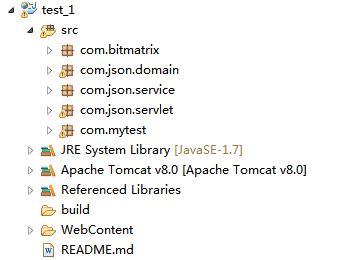
- 使用Json 和 Servelet传递信息
        package json.servlet;
        import java.io.IOException;
        import javax.servlet.ServletException;
        import javax.servlet.ServletOutputStream;
        import javax.servlet.http.HttpServlet;
        import javax.servlet.http.HttpServletRequest;
        import javax.servlet.http.HttpServletResponse;

        import com.google.zxing.BarcodeFormat;
        import com.google.zxing.WriterException;
        import com.google.zxing.client.j2se.MatrixToImageWriter;
        import com.google.zxing.common.BitMatrix;
        import com.google.zxing.qrcode.QRCodeWriter;
        import java.io.PrintWriter;

        import com.json.service.JsonService;
        import com.mytest.Connect;
        import com.json.service.*;
        public class JsonServlet extends HttpServlet {
          private JsonService service;
          private Connect conn = new Connect();

          /**
           * Constructor of the object.
           */
          public JsonServlet() {
            super();
          }

          /**
           * Destruction of the servlet. <br>
           */
          public void destroy() {
            super.destroy(); // Just puts "destroy" string in log
            // Put your code here
          }

          /**
           * The doGet method of the servlet. <br>
           *
           * This method is called when a form has its tag value method equals to get.
           *
           * @param request the request send by the client to the server
           * @param response the response send by the server to the client
           * @throws ServletException if an error occurred
           * @throws IOException if an error occurred
           */
          public void doGet(HttpServletRequest request, HttpServletResponse response)
              throws ServletException, IOException {
            this.doPost(request, response);
          }

          /**
           * The doPost method of the servlet. <br>
           *
           * This method is called when a form has its tag value method equals to post.
           *
           * @param request the request send by the client to the server
           * @param response the response send by the server to the client
           * @throws ServletException if an error occurred
           * @throws IOException if an error occurred
           */
          public void doPost(HttpServletRequest request, HttpServletResponse response)
              throws ServletException, IOException {

            response.setContentType("text/html;charset=utf-8");
            request.setCharacterEncoding("utf-8");
            response.setCharacterEncoding("utf-8");


            String jsonString = "hello world";


            PrintWriter out = response.getWriter();

            out.flush();
            out.close();


          /**
           * Initialization of the servlet. <br>
           *
           * @throws ServletException if an error occurs
           */
          public void init() throws ServletException {
            service = new JsonService();
          }

        }
这里主要关注doPost(),用来处理客户端的请求。

当然,此时我们什么都没有处理
-
配置web.xml使其可以在Tomcat上跑起来
-
将写好的项目发布到Tomcat平台,现在我们就可以进行下一步了。
十二月 07, 2016 3:16:39 下午 org.apache.catalina.core.AprLifecycleListener init 信息: The APR based Apache Tomcat Native library which allows optimal performance in production environments was not found on the java.library.path: C:\Program Files (x86)\Java\jdk1.8.0_101\bin;C:\windows\Sun\Java\bin;C:\windows\system32;C:\windows;C:/Program Files (x86)/Java/jdk1.8.0_101/bin/../jre/bin/client;C:/Program Files (x86)/Java/jdk1.8.0_101/bin/../jre/bin;C:/Program Files (x86)/Java/jdk1.8.0_101/bin/../jre/lib/i386;C:\Program Files (x86)\Java\jdk1.8.0_101\bin;C:\ProgramData\Oracle\Java\javapath;C:\Program Files (x86)\Java\jdk1.7.0_01\bin;C:\apache-ant-1.8.3\apache-ant-1.8.3\bin;C:\Program Files (x86)\Qualcomm\QDART\bin;C:\Python27;C:\windows\system32;C:\windows;C:\windows\System32\Wbem;C:\windows\System32\WindowsPowerShell\v1.0\;C:\Program Files (x86)\Intel\Intel(R) Management Engine Components\DAL;C:\Program Files\Intel\Intel(R) Management Engine Components\DAL;C:\Program Files (x86)\Intel\Intel(R) Management Engine Components\IPT;C:\Program Files\Intel\Intel(R) Management Engine Components\IPT;C:\Program Files (x86)\Java\jdk1.7.0_01\bin;C:\Program Files\TortoiseSVN\bin;C:\Program Files\TortoiseGit\bin;C:\Program Files (x86)\Microsoft SQL Server\100\Tools\Binn\;C:\Program Files\Microsoft SQL Server\100\Tools\Binn\;C:\Program Files\Microsoft SQL Server\100\DTS\Binn\;C:\Program Files\Git\cmd;C:\Program Files (x86)\GtkSharp\2.12\bin;D:\Program Files\nodejs\;E:\Tomcat\apache-maven-3.3.9\bin;C:\Program Files (x86)\Java\jdk1.8.0_101\jre\bin;D:\Program Files\Android\Android Studio\gradle\gradle-2.14.1\bin;C:\Program Files (x86)\Mozilla Firefox\;;D:\Program Files\Docker Toolbox;C:\Users\10192582.ZTE\AppData\Roaming\npm;D:\Program\eclipse-jee-mars-1-win32\eclipse;;. 十二月 07, 2016 3:16:40 下午 org.apache.tomcat.util.digester.SetPropertiesRule begin 警告: [SetPropertiesRule]{Server/Service/Engine/Host/Context} Setting property ‘source’ to ‘org.eclipse.jst.jee.server:visual’ did not find a matching property. 十二月 07, 2016 3:16:40 下午 org.apache.tomcat.util.digester.SetPropertiesRule begin 警告: [SetPropertiesRule]{Server/Service/Engine/Host/Context} Setting property ‘source’ to ‘org.eclipse.jst.jee.server:test_1’ did not find a matching property. 十二月 07, 2016 3:16:40 下午 org.apache.coyote.AbstractProtocol init 信息: Initializing ProtocolHandler [“http-nio-8080”] 十二月 07, 2016 3:16:41 下午 org.apache.tomcat.util.net.NioSelectorPool getSharedSelector 信息: Using a shared selector for servlet write/read 十二月 07, 2016 3:16:41 下午 org.apache.coyote.AbstractProtocol init 信息: Initializing ProtocolHandler [“ajp-nio-8009”] 十二月 07, 2016 3:16:41 下午 org.apache.tomcat.util.net.NioSelectorPool getSharedSelector 信息: Using a shared selector for servlet write/read 十二月 07, 2016 3:16:41 下午 org.apache.catalina.startup.Catalina load 信息: Initialization processed in 2439 ms 十二月 07, 2016 3:16:41 下午 org.apache.catalina.core.StandardService startInternal 信息: Starting service Catalina 十二月 07, 2016 3:16:41 下午 org.apache.catalina.core.StandardEngine startInternal 信息: Starting Servlet Engine: Apache Tomcat/8.0.9 十二月 07, 2016 3:16:42 下午 org.apache.jasper.servlet.TldScanner scanJars 信息: At least one JAR was scanned for TLDs yet contained no TLDs. Enable debug logging for this logger for a complete list of JARs that were scanned but no TLDs were found in them. Skipping unneeded JARs during scanning can improve startup time and JSP compilation time. 十二月 07, 2016 3:16:45 下午 org.apache.jasper.servlet.TldScanner scanJars 信息: At least one JAR was scanned for TLDs yet contained no TLDs. Enable debug logging for this logger for a complete list of JARs that were scanned but no TLDs were found in them. Skipping unneeded JARs during scanning can improve startup time and JSP compilation time. 十二月 07, 2016 3:16:45 下午 org.apache.coyote.AbstractProtocol start 信息: Starting ProtocolHandler [“http-nio-8080”] 十二月 07, 2016 3:16:45 下午 org.apache.coyote.AbstractProtocol start 信息: Starting ProtocolHandler [“ajp-nio-8009”] 十二月 07, 2016 3:16:45 下午 org.apache.catalina.startup.Catalina start 信息: Server startup in 4880 ms
-
如果启动失败,需要将所有的依赖包拷贝到WebInfo\lib下。
二、MySQL
- 要使用mysql,首先需要连接。 java连接到mysql有几种方式,这里使用的是JDBC连接方式
          public void connect(){
            try{
              Class.forName("com.mysql.jdbc.Driver").newInstance();
              conn = (Connection) DriverManager.getConnection(url_read,username_db,password_db);
              stmt = (Statement) conn.createStatement();

            }catch(Exception e){
              e.printStackTrace();
            }
          }
-
Mysql使用的是免费的db4free,代价就是本地连接非常慢。 mysql link
建立所需要的数据库,使用用户名、密码登录。
三、部署
- 将写好的Java Web 项目导出为War包,上传到sae的云应用上,便可以使用啦。
